❤️ 悬浮右侧网页音乐播放器
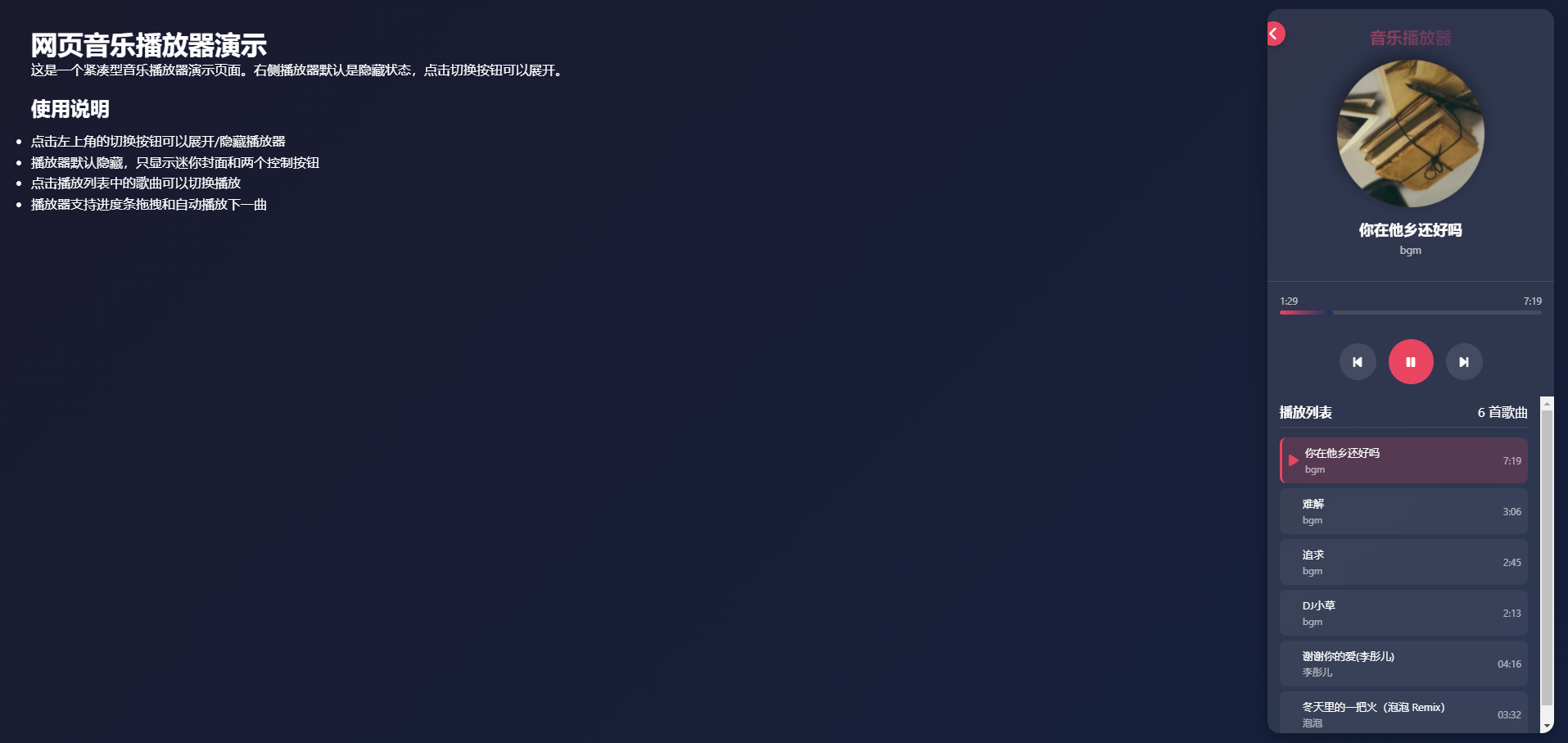
悬浮在网页音乐播放器演示
这是一个紧凑型音乐播放器演示页面。右侧播放器默认是隐藏状态,点击切换按钮可以展开。
使用说明
点击左上角的切换按钮可以展开/隐藏播放器
播放器默认隐藏,只显示迷你封面和两个控制按钮
点击播放列表中的歌曲可以切换播放
播放器支持进度条拖拽和自动播放下一曲
代码如下
<!DOCTYPE html>
<html lang="zh-CN">
<head>
<meta charset="UTF-8">
<meta name="viewport" content="width=device-width, initial-scale=1.0">
<title>网页音乐播放器</title>
<link rel="stylesheet" href="https://cdnjs.cloudflare.com/ajax/libs/font-awesome/6.4.0/css/all.min.css">
<style>
* {
margin: 0;
padding: 0;
box-sizing: border-box;
font-family: 'Segoe UI', Tahoma, Geneva, Verdana, sans-serif;
}
body {
background: linear-gradient(135deg, #1a1a2e 0%, #16213e 100%);
color: #fff;
min-height: 100vh;
display: flex;
padding: 20px;
}
.main-content {
flex: 1;
padding: 20px;
transition: all 0.3s ease;
}
.player-container {
width: 100px; /* 默认宽度为隐藏状态 */
height: 120px; /* 默认高度为隐藏状态 */
background: rgba(255, 255, 255, 0.1);
backdrop-filter: blur(10px);
border-radius: 15px;
box-shadow: 0 8px 25px rgba(0, 0, 0, 0.3);
display: flex;
flex-direction: column;
transition: all 0.4s ease;
overflow: hidden;
position: relative;
}
.player-container.expanded {
width: 350px;
height: calc(100vh - 40px);
}
.toggle-btn {
position: absolute;
top: 15px;
left: -8px;
width: 30px;
height: 30px;
background: #e94560;
border-radius: 50%;
display: flex;
align-items: center;
justify-content: center;
cursor: pointer;
z-index: 10;
box-shadow: 0 3px 8px rgba(0, 0, 0, 0.2);
transition: all 0.3s ease;
}
.toggle-btn:hover {
transform: scale(1.1);
}
.player-header {
padding: 20px 15px 15px;
text-align: center;
border-bottom: 1px solid rgba(255, 255, 255, 0.1);
display: none;
}
.player-container.expanded .player-header {
display: block;
}
.player-header h2 {
font-size: 20px;
margin-bottom: 8px;
background: linear-gradient(90deg, #e94560, #0f3460);
-webkit-background-clip: text;
-webkit-text-fill-color: transparent;
}
.album-cover {
width: 180px;
height: 180px;
margin: 15px auto;
border-radius: 50%;
overflow: hidden;
box-shadow: 0 8px 20px rgba(0, 0, 0, 0.4);
position: relative;
display: none;
}
.player-container.expanded .album-cover {
display: block;
}
.album-cover img {
width: 100%;
height: 100%;
object-fit: cover;
}
.album-cover.rotating {
animation: rotate 15s linear infinite;
}
@keyframes rotate {
from { transform: rotate(0deg); }
to { transform: rotate(360deg); }
}
.song-info {
text-align: center;
margin: 15px 0;
display: none;
}
.player-container.expanded .song-info {
display: block;
}
.song-info h3 {
font-size: 18px;
margin-bottom: 4px;
}
.song-info p {
color: rgba(255, 255, 255, 0.7);
font-size: 13px;
}
.progress-container {
padding: 0 15px;
margin: 15px 0;
display: none;
}
.player-container.expanded .progress-container {
display: block;
}
.progress-info {
display: flex;
justify-content: space-between;
font-size: 11px;
color: rgba(255, 255, 255, 0.7);
margin-bottom: 4px;
}
.progress-bar {
width: 100%;
height: 5px;
background: rgba(255, 255, 255, 0.1);
border-radius: 8px;
overflow: hidden;
cursor: pointer;
}
.progress {
height: 100%;
background: linear-gradient(90deg, #e94560, #0f3460);
border-radius: 8px;
width: 0%;
transition: width 0.1s linear;
}
.controls {
display: flex;
justify-content: center;
align-items: center;
gap: 15px;
margin: 15px 0;
display: none;
}
.player-container.expanded .controls {
display: flex;
}
.control-btn {
width: 45px;
height: 45px;
border-radius: 50%;
background: rgba(255, 255, 255, 0.1);
display: flex;
align-items: center;
justify-content: center;
cursor: pointer;
transition: all 0.3s ease;
border: none;
color: white;
font-size: 16px;
}
.control-btn:hover {
background: rgba(255, 255, 255, 0.2);
transform: scale(1.1);
}
.control-btn.play-pause {
width: 55px;
height: 55px;
background: #e94560;
}
.control-btn.play-pause:hover {
background: #ff577f;
transform: scale(1.1);
}
.playlist-container {
flex: 1;
overflow-y: auto;
padding: 8px 15px;
display: none;
}
.player-container.expanded .playlist-container {
display: block;
}
.playlist-header {
display: flex;
justify-content: space-between;
align-items: center;
margin-bottom: 12px;
padding-bottom: 8px;
border-bottom: 1px solid rgba(255, 255, 255, 0.1);
}
.playlist-header h3 {
font-size: 16px;
}
.playlist {
list-style: none;
}
.playlist li {
display: flex;
align-items: center;
padding: 10px 8px;
border-radius: 8px;
margin-bottom: 6px;
cursor: pointer;
transition: all 0.2s ease;
background: rgba(255, 255, 255, 0.05);
}
.playlist li:hover {
background: rgba(255, 255, 255, 0.1);
}
.playlist li.active {
background: rgba(233, 69, 96, 0.2);
border-left: 3px solid #e94560;
}
.playlist li .play-icon {
margin-right: 8px;
color: #e94560;
opacity: 0;
transition: opacity 0.2s ease;
}
.playlist li.active .play-icon {
opacity: 1;
}
.playlist li .song-details {
flex: 1;
}
.playlist li .song-title {
font-size: 13px;
margin-bottom: 3px;
}
.playlist li .song-artist {
font-size: 11px;
color: rgba(255, 255, 255, 0.6);
}
.playlist li .song-duration {
font-size: 11px;
color: rgba(255, 255, 255, 0.6);
}
.collapsed-view {
display: flex;
flex-direction: column;
align-items: center;
justify-content: center;
height: 100%;
padding: 10px;
}
.player-container.expanded .collapsed-view {
display: none;
}
.mini-album-cover {
width: 50px;
height: 50px;
border-radius: 50%;
overflow: hidden;
box-shadow: 0 4px 12px rgba(0, 0, 0, 0.3);
margin-bottom: 10px;
}
.mini-album-cover img {
width: 100%;
height: 100%;
object-fit: cover;
}
.mini-album-cover.rotating {
animation: rotate 15s linear infinite;
}
.mini-controls {
display: flex;
gap: 8px;
}
.mini-control-btn {
width: 28px;
height: 28px;
border-radius: 50%;
background: rgba(255, 255, 255, 0.1);
display: flex;
align-items: center;
justify-content: center;
cursor: pointer;
transition: all 0.3s ease;
border: none;
color: white;
font-size: 13px;
}
.mini-control-btn:hover {
background: rgba(255, 255, 255, 0.2);
}
.mini-control-btn.play-pause {
background: #e94560;
}
.mini-control-btn.play-pause:hover {
background: #ff577f;
}
</style>
</head>
<body>
<div class="main-content">
<h1>网页音乐播放器演示</h1>
<p>这是一个紧凑型音乐播放器演示页面。右侧播放器默认是隐藏状态,点击切换按钮可以展开。</p>
<div style="margin-top: 20px;">
<h2>使用说明</h2>
<ul style="margin-top: 12px; line-height: 1.6;">
<li>点击左上角的切换按钮可以展开/隐藏播放器</li>
<li>播放器默认隐藏,只显示迷你封面和两个控制按钮</li>
<li>点击播放列表中的歌曲可以切换播放</li>
<li>播放器支持进度条拖拽和自动播放下一曲</li>
</ul>
</div>
</div>
<div class="player-container">
<div class="toggle-btn" id="toggleBtn">
<i class="fas fa-chevron-left"></i>
</div>
<div class="player-header">
<h2>音乐播放器</h2>
<div class="album-cover" id="albumCover">
<img src="https://picsum.photos/400/400?music" alt="专辑封面">
</div>
<div class="song-info">
<h3 id="songTitle">歌曲名称</h3>
<p id="songArtist">歌手名称</p>
</div>
</div>
<div class="progress-container">
<div class="progress-info">
<span id="currentTime">00:00</span>
<span id="totalTime">00:00</span>
</div>
<div class="progress-bar" id="progressBar">
<div class="progress" id="progress"></div>
</div>
</div>
<div class="controls">
<button class="control-btn" id="prevBtn">
<i class="fas fa-step-backward"></i>
</button>
<button class="control-btn play-pause" id="playPauseBtn">
<i class="fas fa-play"></i>
</button>
<button class="control-btn" id="nextBtn">
<i class="fas fa-step-forward"></i>
</button>
</div>
<div class="playlist-container">
<div class="playlist-header">
<h3>播放列表</h3>
<span id="playlistCount">5 首歌曲</span>
</div>
<ul class="playlist" id="playlist">
<!-- 播放列表将通过JavaScript动态生成 -->
</ul>
</div>
<div class="collapsed-view">
<div class="mini-album-cover" id="miniAlbumCover">
<img src="https://picsum.photos/400/400?music" alt="专辑封面">
</div>
<div class="mini-controls">
<button class="mini-control-btn play-pause" id="miniPlayPauseBtn">
<i class="fas fa-play"></i>
</button>
<button class="mini-control-btn" id="miniNextBtn">
<i class="fas fa-step-forward"></i>
</button>
</div>
</div>
</div>
<script>
document.addEventListener('DOMContentLoaded', function() {
// 播放器状态
const playerState = {
isPlaying: false,
currentSongIndex: 0,
isExpanded: false, // 默认不展开
audio: new Audio()
};
// 播放列表数据
const playlist = [
{
title: "你在他乡还好吗",
artist: "bgm",
duration: "7:19",
cover: "https://picsum.photos/400/400?music2",
mp3: "https://5blog.cn/tx/1/%E4%BD%A0%E5%9C%A8%E4%BB%96%E4%B9%A1%E8%BF%98%E5%A5%BD%E5%90%97.mp3"
},
{
title: "难解",
artist: "bgm",
duration: "3:06",
cover: "https://picsum.photos/400/400?music3",
mp3: "https://5blog.cn/tx/1/%E9%9A%BE%E8%A7%A3.mp3"
},
{
title: "追求",
artist: "bgm",
duration: "2:45",
cover: "https://picsum.photos/400/400?music4",
mp3: "https://5blog.cn/tx/1/zhuiqiu.mp3"
},
{
title: " DJ小草",
artist: "bgm",
duration: "2:13",
cover: "https://picsum.photos/400/400?music5",
mp3: "https://5blog.cn/tx/1/DJ%E5%B0%8F%E8%8D%89.mp3"
},
{
title: "谢谢你的爱(李彤儿)",
artist: "李彤儿",
duration: "04:16",
cover: "https://picsum.photos/id/1043/400/400",
mp3: "https://pan.5blog.cn/view.php/b1d82a2184c9b2ad042d9894ce430c55.mp3",
},
{
title: "冬天里的一把火(泡泡 Remix)",
artist: "泡泡",
duration: "03:32",
cover: "https://picsum.photos/id/1043/400/400",
mp3: "https://pan.5blog.cn/view.php/ee933be578a7d888bb388a23fa2ea9f4.mp3",
},
];
// DOM元素
const toggleBtn = document.getElementById('toggleBtn');
const playerContainer = document.querySelector('.player-container');
const albumCover = document.getElementById('albumCover');
const miniAlbumCover = document.getElementById('miniAlbumCover');
const songTitle = document.getElementById('songTitle');
const songArtist = document.getElementById('songArtist');
const playPauseBtn = document.getElementById('playPauseBtn');
const miniPlayPauseBtn = document.getElementById('miniPlayPauseBtn');
const prevBtn = document.getElementById('prevBtn');
const nextBtn = document.getElementById('nextBtn');
const miniNextBtn = document.getElementById('miniNextBtn');
const currentTimeEl = document.getElementById('currentTime');
const totalTimeEl = document.getElementById('totalTime');
const progressBar = document.getElementById('progressBar');
const progress = document.getElementById('progress');
const playlistEl = document.getElementById('playlist');
const playlistCount = document.getElementById('playlistCount');
// 初始化播放器
function initPlayer() {
// 设置播放列表计数
playlistCount.textContent = `${playlist.length} 首歌曲`;
// 生成播放列表
renderPlaylist();
// 加载第一首歌曲
loadSong(playerState.currentSongIndex);
// 设置音频事件监听
setupAudioListeners();
// 默认隐藏播放器(已经是默认状态,这里确保图标方向正确)
updateToggleButton();
}
// 设置音频事件监听
function setupAudioListeners() {
playerState.audio.addEventListener('timeupdate', updateProgress);
playerState.audio.addEventListener('ended', playNextSong);
}
// 更新进度条
function updateProgress() {
const currentTime = playerState.audio.currentTime;
const duration = playerState.audio.duration || parseTimeString(playlist[playerState.currentSongIndex].duration);
const progressPercent = (currentTime / duration) * 100;
progress.style.width = `${progressPercent}%`;
currentTimeEl.textContent = formatTime(currentTime);
}
// 渲染播放列表
function renderPlaylist() {
playlistEl.innerHTML = '';
playlist.forEach((song, index) => {
const li = document.createElement('li');
li.className = index === playerState.currentSongIndex ? 'active' : '';
li.innerHTML = `
<i class="fas fa-play play-icon"></i>
<div class="song-details">
<div class="song-title">${song.title}</div>
<div class="song-artist">${song.artist}</div>
</div>
<div class="song-duration">${song.duration}</div>
`;
li.addEventListener('click', () => {
playerState.currentSongIndex = index;
loadSong(index);
if (playerState.isPlaying) {
playSong();
}
renderPlaylist();
});
playlistEl.appendChild(li);
});
}
// 加载歌曲
function loadSong(index) {
const song = playlist[index];
songTitle.textContent = song.title;
songArtist.textContent = song.artist;
albumCover.querySelector('img').src = song.cover;
miniAlbumCover.querySelector('img').src = song.cover;
totalTimeEl.textContent = song.duration;
currentTimeEl.textContent = '0:00';
progress.style.width = '0%';
// 设置音频源
playerState.audio.src = song.mp3;
if (playerState.isPlaying) {
playerState.audio.play();
}
}
// 播放歌曲
function playSong() {
playerState.isPlaying = true;
playPauseBtn.innerHTML = '<i class="fas fa-pause"></i>';
miniPlayPauseBtn.innerHTML = '<i class="fas fa-pause"></i>';
albumCover.classList.add('rotating');
miniAlbumCover.classList.add('rotating');
playerState.audio.play();
}
// 暂停歌曲
function pauseSong() {
playerState.isPlaying = false;
playPauseBtn.innerHTML = '<i class="fas fa-play"></i>';
miniPlayPauseBtn.innerHTML = '<i class="fas fa-play"></i>';
albumCover.classList.remove('rotating');
miniAlbumCover.classList.remove('rotating');
playerState.audio.pause();
}
// 播放下一首歌曲
function playNextSong() {
playerState.currentSongIndex = (playerState.currentSongIndex + 1) % playlist.length;
loadSong(playerState.currentSongIndex);
if (playerState.isPlaying) {
playSong();
}
renderPlaylist();
}
// 播放上一首歌曲
function playPrevSong() {
playerState.currentSongIndex = (playerState.currentSongIndex - 1 + playlist.length) % playlist.length;
loadSong(playerState.currentSongIndex);
if (playerState.isPlaying) {
playSong();
}
renderPlaylist();
}
// 更新切换按钮图标
function updateToggleButton() {
const icon = toggleBtn.querySelector('i');
if (playerState.isExpanded) {
icon.classList.remove('fa-chevron-right');
icon.classList.add('fa-chevron-left');
} else {
icon.classList.remove('fa-chevron-left');
icon.classList.add('fa-chevron-right');
}
}
// 将时间字符串转换为秒数
function parseTimeString(timeStr) {
const parts = timeStr.split(':');
return parseInt(parts[0]) * 60 + parseInt(parts[1]);
}
// 将秒数格式化为时间字符串
function formatTime(seconds) {
const mins = Math.floor(seconds / 60);
const secs = Math.floor(seconds % 60);
return `${mins}:${secs < 10 ? '0' : ''}${secs}`;
}
// 事件监听器
toggleBtn.addEventListener('click', function() {
playerState.isExpanded = !playerState.isExpanded;
playerContainer.classList.toggle('expanded', playerState.isExpanded);
updateToggleButton();
});
playPauseBtn.addEventListener('click', function() {
if (playerState.isPlaying) {
pauseSong();
} else {
playSong();
}
});
miniPlayPauseBtn.addEventListener('click', function() {
if (playerState.isPlaying) {
pauseSong();
} else {
playSong();
}
});
nextBtn.addEventListener('click', playNextSong);
miniNextBtn.addEventListener('click', playNextSong);
prevBtn.addEventListener('click', playPrevSong);
// 进度条点击事件
progressBar.addEventListener('click', function(e) {
const rect = progressBar.getBoundingClientRect();
const clickX = e.clientX - rect.left;
const width = rect.width;
const percent = clickX / width;
const duration = playerState.audio.duration || parseTimeString(playlist[playerState.currentSongIndex].duration);
playerState.audio.currentTime = duration * percent;
});
// 初始化播放器
initPlayer();
});
</script>
</body>
</html>演示地址
阅读:73
发布时间: