💛 CD风格音乐播放器 - 带频谱显示
用元宝写了一个带蘋谱的音乐播放器,感觉还可以,,有需要的可以拿去
注意 音乐和HTML 上传同一根目录里面 不然意想不到的结果 哈哈。。。
先上效果图
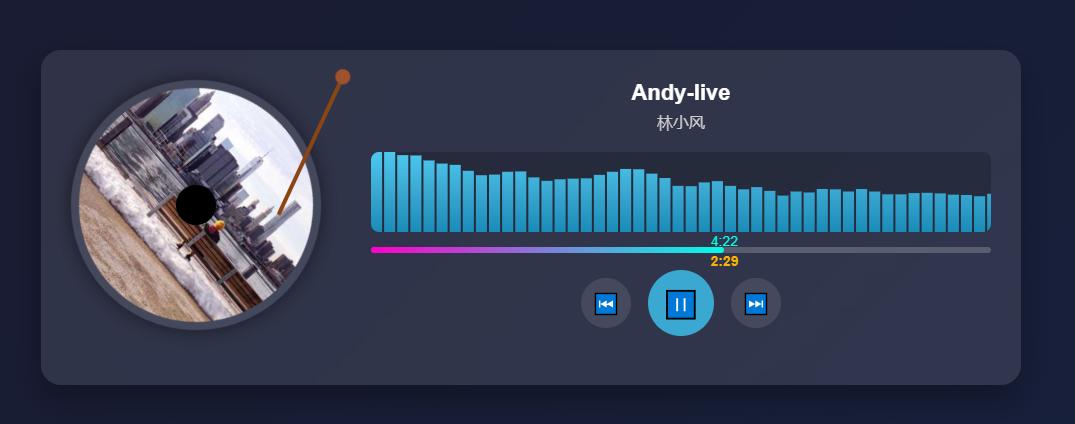
代码
<!DOCTYPE html>
<html lang="zh-CN">
<head>
<meta charset="UTF-8">
<meta name="viewport" content="width=device-width, initial-scale=1.0">
<title>CD风格音乐播放器 - 带频谱显示</title>
<style>
* {
margin: 0;
padding: 0;
box-sizing: border-box;
}
body {
font-family: 'Arial', sans-serif;
display: flex;
justify-content: center;
align-items: center;
min-height: 100vh;
background: linear-gradient(135deg, #1a1a2e 0%, #16213e 100%);
color: #fff;
padding: 20px;
}
.music-player {
width: 100%;
max-width: 980px;
background: rgba(255, 255, 255, 0.1);
border-radius: 20px;
padding: 30px;
box-shadow: 0 15px 30px rgba(0, 0, 0, 0.3);
backdrop-filter: blur(10px);
text-align: center;
display: flex;
}
.right-box{
width:calc(100% - 300px);
}
.album-cover-container {
position: relative;
width: 250px;
height: 250px;
margin: 0 auto 25px;
margin-right:50px;
}
.album-cover {
width: 100%;
height: 100%;
border-radius: 50%;
object-fit: cover;
box-shadow: 0 0 20px rgba(0, 0, 0, 0.5);
border: 8px solid rgba(255, 255, 255, 0.1);
transition: transform 0.3s ease;
cursor: pointer;
}
.cd-center {
position: absolute;
top: 50%;
left: 50%;
transform: translate(-50%, -50%);
width: 40px;
height: 40px;
background: #000;
border-radius: 50%;
z-index: 2;
box-shadow: 0 0 5px rgba(0, 0, 0, 0.5);
}
.needle {
position: absolute;
top: -10px;
left: 110%;
transform: translateX(-50%) rotate(0deg);
width: 4px;
height: 160px;
background: #8b4513;
border-radius: 2px;
transform-origin: top center;
transition: transform 0.5s ease;
z-index: 1;
}
.needle-head {
position: absolute;
top: 0;
left: 50%;
transform: translateX(-50%);
width: 15px;
height: 15px;
background: #a0522d;
border-radius: 50%;
}
.needle.playing {
transform: translateX(-50%) rotate(25deg);
}
.rotating {
animation: rotate 10s linear infinite;
}
@keyframes rotate {
from { transform: rotate(0deg); }
to { transform: rotate(360deg); }
}
.song-info {
margin-bottom: 20px;
}
.song-title {
font-size: 22px;
font-weight: bold;
margin-bottom: 5px;
}
.song-artist {
font-size: 16px;
color: #ccc;
}
/* 频谱显示区域 */
.spectrum-container {
width: 100%;
height: 80px;
margin-bottom: 15px;
position: relative;
overflow: hidden;
background: rgba(0, 0, 0, 0.2);
border-radius: 8px;
}
.spectrum-canvas {
width: 100%;
height: 100%;
display: block;
}
.progress-container {
width: 100%;
margin-bottom: 25px;
position: relative;
}
.progress-bar {
width: 100%;
height: 6px;
background: rgba(255, 255, 255, 0.2);
border-radius: 3px;
overflow: visible;
cursor: pointer;
position: relative;
}
.progress {
width: 0%;
height: 100%;
background: linear-gradient(90deg,#ff00ca,#00ffe7);
border-radius: 3px;
transition: width 0.1s linear;
position: relative;
}
.time-display {
position: relative;
width: 100%;
height: 15px;
margin-top: -20px;
}
.current-time {
font-size: 14px;
color: #ffb300;
font-weight: bold;
position: absolute;
left: 0;
transform: translateX(-50%);
transition: left 0.1s linear;
min-width: 45px;
text-align: center;
z-index: 10;
}
.total-time {
font-size: 14px;
color: #00ffe7;
position: absolute;
left: 0;
transform: translateX(-50%);
transition: left 0.1s linear;
min-width: 45px;
text-align: center;
z-index: 5;
margin-top: 20px;
}
.controls {
display: flex;
justify-content: center;
align-items: center;
gap: 20px;
}
.control-btn {
width: 50px;
height: 50px;
border-radius: 50%;
background: rgba(255, 255, 255, 0.1);
border: none;
color: white;
font-size: 20px;
cursor: pointer;
display: flex;
justify-content: center;
align-items: center;
transition: all 0.3s ease;
}
.control-btn:hover {
background: rgba(255, 255, 255, 0.2);
transform: scale(1.1);
}
.play-pause {
width: 60px;
height: 60px;
background: #4cc9f0;
font-size: 24px;
}
.play-pause:hover {
background: #3aa8d0;
}
.loading {
color: #ccc;
font-size: 14px;
margin-top: 10px;
}
</style>
</head>
<body>
<div class="music-player">
<div class="album-cover-container">
<div class="needle" id="needle">
<div class="needle-head"></div>
</div>
<img src="https://picsum.photos/400/400?random=1" alt="专辑封面" class="album-cover" id="albumCover">
<div class="cd-center"></div>
</div>
<div class="right-box">
<div class="song-info">
<div class="song-title" id="songTitle">夏日微风</div>
<div class="song-artist" id="songArtist">林小风</div>
</div>
<!-- 频谱显示区域 -->
<div class="spectrum-container">
<canvas id="spectrumCanvas" class="spectrum-canvas"></canvas>
</div>
<div class="progress-container">
<div class="progress-bar" id="progressBar">
<div class="progress" id="progress"></div>
</div>
<div class="time-display">
<span class="current-time" id="currentTime">0:00</span>
<span class="total-time" id="totalTime"> - 0:00</span>
</div>
<div class="loading" id="loadingText">加载音频中...</div>
</div>
<div class="controls">
<button class="control-btn" id="prevBtn">⏮</button>
<button class="control-btn play-pause" id="playPauseBtn">▶</button>
<button class="control-btn" id="nextBtn">⏭</button>
</div>
<audio id="audioPlayer" preload="metadata">
<source src="https://www.soundhelix.com/examples/mp3/SoundHelix-Song-1.mp3" type="audio/mpeg">
您的浏览器不支持音频播放。
</audio>
</div>
</div>
<script>
// 获取DOM元素
const audioPlayer = document.getElementById('audioPlayer');
const albumCover = document.getElementById('albumCover');
const needle = document.getElementById('needle');
const playPauseBtn = document.getElementById('playPauseBtn');
const prevBtn = document.getElementById('prevBtn');
const nextBtn = document.getElementById('nextBtn');
const progressBar = document.getElementById('progressBar');
const progress = document.getElementById('progress');
const currentTimeEl = document.getElementById('currentTime');
const totalTimeEl = document.getElementById('totalTime');
const songTitle = document.getElementById('songTitle');
const songArtist = document.getElementById('songArtist');
const loadingText = document.getElementById('loadingText');
const spectrumCanvas = document.getElementById('spectrumCanvas');
const ctx = spectrumCanvas.getContext('2d');
// 设置Canvas尺寸
spectrumCanvas.width = spectrumCanvas.offsetWidth;
spectrumCanvas.height = spectrumCanvas.offsetHeight;
// 模拟音乐数据
const playlist = [
{
title: "酒干倘卖无DJ",
artist: "网络",
src: "https://pan.5blog.cn/view.php/21367832cf5f5aba290cd3a4c9abdcdb.mp3",
cover: "https://picsum.photos/id/1025/400/400",
},
{
title: " 骗子动嘴傻子动心 (DJ版)",
artist: "大美",
src: "https://pan.5blog.cn/view.php/19db7cd9c8f44770d0c1fd293b266a23.mp3",
cover: "https://picsum.photos/id/1035/400/400",
},
{
title: "爱情诺曼底dj-张小易",
artist: "张小易",
src: "https://pan.5blog.cn/view.php/766beaf43337954eb0029be7e201a23d.mp3",
cover: "https://picsum.photos/id/1040/400/400",
}
];
let currentSongIndex = 0;
let audioContext, analyser, dataArray, bufferLength;
let isPlaying = false;
// 格式化时间(秒 -> 分:秒)[1,5](@ref)
function formatTime(seconds) {
if (isNaN(seconds) || seconds === Infinity) return "0:00";
const mins = Math.floor(seconds / 60);
const secs = Math.floor(seconds % 60);
return `${mins}:${secs < 10 ? '0' : ''}${secs}`;
}
// 初始化音频分析器 [6,7](@ref)
function initAudioAnalyzer() {
// 创建音频上下文
audioContext = new (window.AudioContext || window.webkitAudioContext)();
analyser = audioContext.createAnalyser();
// 创建音频源节点
const source = audioContext.createMediaElementSource(audioPlayer);
// 连接分析器
source.connect(analyser);
analyser.connect(audioContext.destination);
// 设置FFT大小
analyser.fftSize = 256;
bufferLength = analyser.frequencyBinCount;
dataArray = new Uint8Array(bufferLength);
}
// 绘制频谱 [6,7](@ref)
function drawSpectrum() {
if (!isPlaying || !analyser) return;
requestAnimationFrame(drawSpectrum);
// 获取频率数据
analyser.getByteFrequencyData(dataArray);
// 清除画布
ctx.clearRect(0, 0, spectrumCanvas.width, spectrumCanvas.height);
// 计算条宽和间距
const barWidth = (spectrumCanvas.width / bufferLength) * 2.5;
let x = 0;
for (let i = 0; i < bufferLength; i++) {
// 计算条高
const barHeight = (dataArray[i] / 255) * spectrumCanvas.height;
// 创建渐变颜色
const gradient = ctx.createLinearGradient(0, 0, 0, spectrumCanvas.height);
gradient.addColorStop(0, '#4cc9f0');
gradient.addColorStop(0.5, '#3aa8d0');
gradient.addColorStop(1, '#1a8bb8');
// 绘制频谱条
ctx.fillStyle = gradient;
ctx.fillRect(
x,
spectrumCanvas.height - barHeight,
barWidth - 1,
barHeight
);
x += barWidth + 1;
}
}
// 更新播放器信息
function updatePlayerInfo() {
const song = playlist[currentSongIndex];
songTitle.textContent = song.title;
songArtist.textContent = song.artist;
albumCover.src = song.cover;
audioPlayer.src = song.src;
loadingText.style.display = 'block';
totalTimeEl.textContent = "0:00";
currentTimeEl.textContent = "0:00";
progress.style.width = "0%";
currentTimeEl.style.left = "0px";
totalTimeEl.style.left = "0px";
// 清除Canvas
ctx.clearRect(0, 0, spectrumCanvas.width, spectrumCanvas.height);
// 等待音频加载完成
audioPlayer.load();
// 加载音频元数据 [1](@ref)
audioPlayer.addEventListener('loadedmetadata', function() {
totalTimeEl.textContent = formatTime(audioPlayer.duration);
loadingText.style.display = 'none';
});
}
// 播放/暂停音乐 [2,4](@ref)
function togglePlayPause() {
if (audioPlayer.paused) {
// 初始化音频分析器
if (!audioContext) {
initAudioAnalyzer();
}
// 恢复音频上下文(某些浏览器需要用户交互后)[6](@ref)
if (audioContext.state === 'suspended') {
audioContext.resume();
}
audioPlayer.play().then(() => {
playPauseBtn.innerHTML = '⏸';
albumCover.classList.add('rotating');
needle.classList.add('playing');
isPlaying = true;
// 开始绘制频谱
drawSpectrum();
}).catch(error => {
console.error('播放失败:', error);
loadingText.textContent = '播放失败,请点击重试';
});
} else {
audioPlayer.pause();
playPauseBtn.innerHTML = '▶';
albumCover.classList.remove('rotating');
needle.classList.remove('playing');
isPlaying = false;
}
}
// 点击封面控制播放/暂停
albumCover.addEventListener('click', togglePlayPause);
// 播放/暂停按钮事件
playPauseBtn.addEventListener('click', togglePlayPause);
// 上一首 [4,5](@ref)
prevBtn.addEventListener('click', function() {
currentSongIndex = (currentSongIndex - 1 + playlist.length) % playlist.length;
updatePlayerInfo();
if (!audioPlayer.paused) {
audioPlayer.play();
}
});
// 下一首 [4,5](@ref)
nextBtn.addEventListener('click', function() {
currentSongIndex = (currentSongIndex + 1) % playlist.length;
updatePlayerInfo();
if (!audioPlayer.paused) {
audioPlayer.play();
}
});
// 更新进度条和时间显示 [1,2](@ref)
audioPlayer.addEventListener('timeupdate', function() {
const currentTime = audioPlayer.currentTime;
const duration = audioPlayer.duration;
if (duration && !isNaN(duration) && duration !== Infinity) {
const progressPercent = (currentTime / duration) * 100;
progress.style.width = `${progressPercent}%`;
currentTimeEl.textContent = formatTime(currentTime);
totalTimeEl.textContent = formatTime(duration);
// 更新当前时间和总时间位置
const progressBarWidth = progressBar.offsetWidth;
const timePos = (progressPercent / 100) * progressBarWidth;
currentTimeEl.style.left = `${timePos}px`;
totalTimeEl.style.left = `${timePos}px`;
// 边界检测,确保时间显示不重叠
const minDistance = 30; // 最小间距
if (timePos < progressBarWidth / 2) {
currentTimeEl.style.transform = 'translateX(-50%)';
totalTimeEl.style.transform = 'translateX(-50%)';
currentTimeEl.style.marginTop = '0px';
totalTimeEl.style.marginTop = '20px';
} else {
currentTimeEl.style.transform = 'translateX(-50%)';
totalTimeEl.style.transform = 'translateX(-50%)';
currentTimeEl.style.marginTop = '20px';
totalTimeEl.style.marginTop = '0px';
}
}
});
// 点击进度条跳转 [2](@ref)
progressBar.addEventListener('click', function(e) {
const rect = progressBar.getBoundingClientRect();
const clickX = e.clientX - rect.left;
const width = rect.width;
const duration = audioPlayer.duration;
if (duration && !isNaN(duration) && duration !== Infinity) {
audioPlayer.currentTime = (clickX / width) * duration;
}
});
// 歌曲结束时自动下一首 [4](@ref)
audioPlayer.addEventListener('ended', function() {
currentSongIndex = (currentSongIndex + 1) % playlist.length;
updatePlayerInfo();
audioPlayer.play();
});
// 音频加载错误处理
audioPlayer.addEventListener('error', function() {
loadingText.textContent = '音频加载失败,请检查网络连接';
});
// 窗口大小变化时调整Canvas尺寸 [6](@ref)
window.addEventListener('resize', function() {
spectrumCanvas.width = spectrumCanvas.offsetWidth;
spectrumCanvas.height = spectrumCanvas.offsetHeight;
});
// 初始化播放器
updatePlayerInfo();
</script>
</body>
</html>演示效果
https://pan.5blog.cn/view.php/332cedea8a906b2f24868b7393bef022.html
阅读:73
发布时间: